
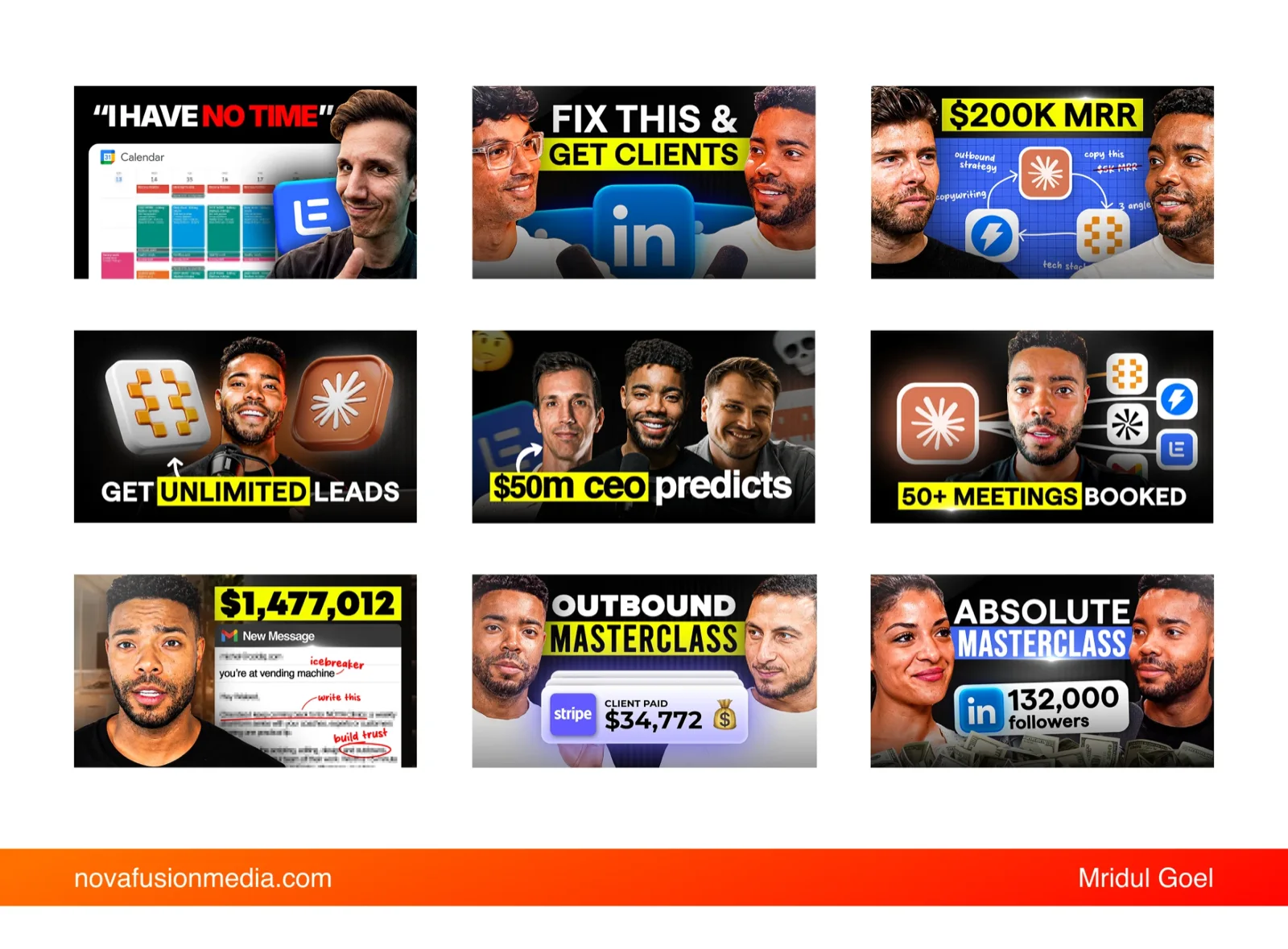
First, who ColdIQ are
ColdIQ sell sales technology. Their YouTube channel is where they teach outbound — the tooling, the workflows, the tactics that actually book meetings — and the audience watching is sharp, busy and professionally sceptical. These are people who evaluate software for a living. They can smell a thumbnail that is trying too hard from across the sidebar.
We edit their videos and design their thumbnails. That order matters, and I will come back to why.
The problem: the thumbnail is the whole funnel
Everything you spend on a video — the filming, the scripting, the week of editing — converts at a rate set by one image and one line of text. If nobody clicks, nothing else you did happened.
Yet in most teams the thumbnail is the last thirty minutes of a three-week project. Somebody exports a frame, drops a word on it in a bold font, and uploads. The video underperforms, and the conclusion drawn is that the topic was wrong.
You are not competing on video quality. You are competing for a click that gets decided in under two seconds, by someone who has not watched anything yet.
Now it gets worse: the AI shortcut
There is a faster option now. Describe the thumbnail, get the thumbnail. It takes nine seconds and it looks, on your monitor, completely fine.
Here is what it costs you.
- It has not seen your video. A thumbnail is a claim about what is inside. A model that has only read your prompt is guessing at the claim.
- It optimises towards the average. Generative models are trained to produce what a thumbnail typically looks like. But the goal is not to look like a thumbnail — it is to look unlike the other eleven on the screen. Average is the one thing guaranteed not to work.
- It cannot see your competition. It does not know that every video in your niche went dark and high-contrast this month, so going light would make you the outlier.
- Generated faces leak trust. Viewers clock a synthetic face faster than they can explain why, and the suspicion transfers straight to the video.
- Text rendering is still unreliable at the exact sizes where a thumbnail has to be perfectly legible.
And the real damage is compounding. Click-through rate is an input to how aggressively YouTube distributes a video. A thumbnail that underperforms does not just lose the clicks it would have won — it suppresses the impressions the video gets offered in the first place. The free thumbnail is the most expensive part of the upload.
What a viewer is actually doing
Before the process makes sense, it helps to know what you are designing against. Nobody looks at a thumbnail and clicks. They run a loop, and it takes about a second and a half. Kallaway has broken this down well, and it matches what we see in the data on ColdIQ's videos:
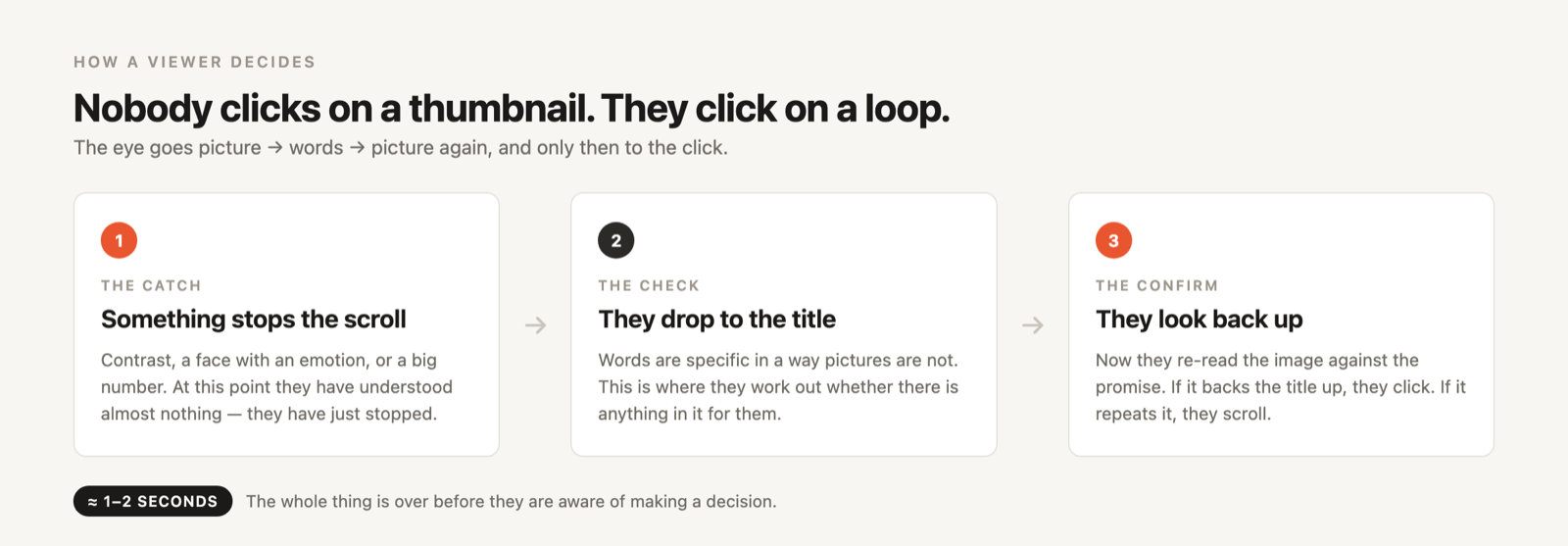
This is why a thumbnail that simply repeats the title fails. By the time the viewer looks back at the image, they already know what the title said. If the picture tells them nothing new, there is nothing to confirm, and they scroll. The thumbnail's second job is to make the title's promise believable.
Our process, step by step
Know the video before you open anything
Before a single file is opened, four things are already known: what the video is actually about, the exact title, how the first ten seconds play, and the channel's standing preferences.
We get this for free, because we edit the videos too. If you are briefing a designer who has not seen the cut, send them these four things in writing. Everything downstream is guesswork without them.
Go find the outliers
We search the topic on YouTube and look for videos that beat their own channel's average — not the biggest channels, the over-performing videos. A 90k view video on a 20k channel is a signal. A 900k view video on a 2M channel is not.
If the exact topic has no clear outlier, we widen to adjacent topics and bring the winning structure across. We are never copying the look. We are working out what made it win, then making that argument for ColdIQ's video.
Name the one promise
Two sentences, written down before any design: what does this viewer want, and what is stopping them? For ColdIQ that is usually some version of more meetings booked, less manual work.
Then the thumbnail gets the job of supporting that promise without restating it. If the title already says "outbound masterclass", the image does not need the words "outbound masterclass" — it needs to show you the Stripe notification that makes the masterclass worth sitting through.
Use AI where it is genuinely good
We use it constantly — just never for the concept.
- Frames from the real footage. We pull the best expressions out of the video itself, so the face in the thumbnail is a real moment from the thing you are about to watch.
- Cleanup. Gemini and ChatGPT handle removing a distracting object, cleaning a background plate, fixing a blown highlight.
- Upscaling a frame that is too soft once it is scaled up in the composition.
The division is simple. AI is excellent at repair. It is poor at judgement. Which frame, which promise, which three elements — that is the part that decides whether the thing works, and it stays with a person who has watched the video.
Build it: Figma, then Photoshop
Figma for assets that are faster to construct with vectors — device frames, UI mockups, badges, the clean geometric pieces.
Photoshop to assemble: face shots, text, shapes, highlight blocks, blending modes, the Figma assets, the background. Everything that needs real compositing control lands here.
Shrink it before you ship it
Zoom the finished design down to roughly 170 pixels wide and look at it there. That is where it actually gets judged. Elements that felt confident at full size turn to mush, and you find out now rather than from the analytics.
Then do not ship one. YouTube has a built-in A/B test for thumbnails — use it. Designing a single thumbnail and hoping is leaving the video's entire reach to chance.
The rules we design by
These are the things that hold up across hundreds of thumbnails.
- Yellow for the word that carries the promise. Highlight one phrase, never the whole line. Look back at that grid of nine — the yellow is always sitting on the word doing the work.
- Contrast is the whole game. White on black, black on white, bright against dark. If you squint and the shapes stop separating, it fails.
- Design left to right. Eyes land left and travel right. Put the thing that stops the scroll where the eye arrives, not where it leaves.
- Brighten and sharpen the face. This one works every single time. Lift the face off the background with light and a little separation.
- Bold sans-serif, always. Thin type disappears at thumbnail size. So does anything with delicate serifs.
- Match the emotion to the payoff. The expression on the face is a promise about how the viewer will feel at the end of the video. Make sure it is a promise the video keeps.
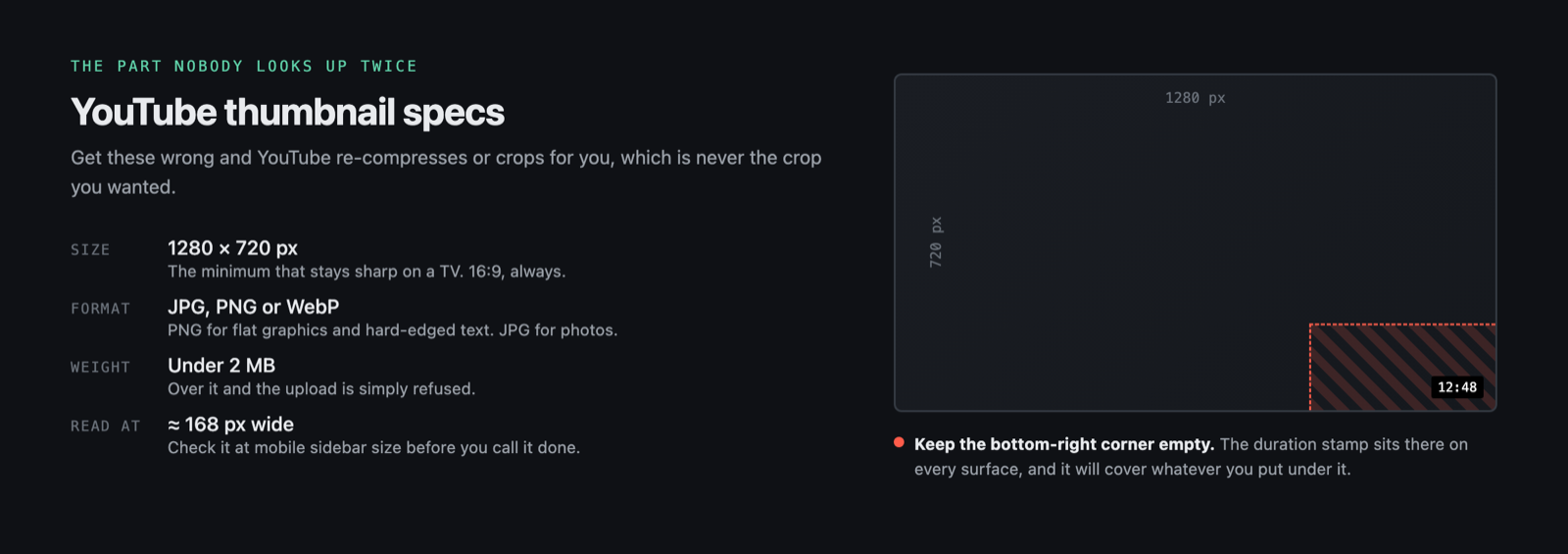
- Keep the bottom-right corner clear. The duration stamp sits there and will cover whatever you put under it.
- Shoot a batch of expressions once. Ten minutes in front of a camera — happy, surprised, sceptical, pointing left, pointing right, arms crossed — and your designer has a library for months.
The specs, so you are not looking them up
Questions we get asked
What makes a good YouTube thumbnail?
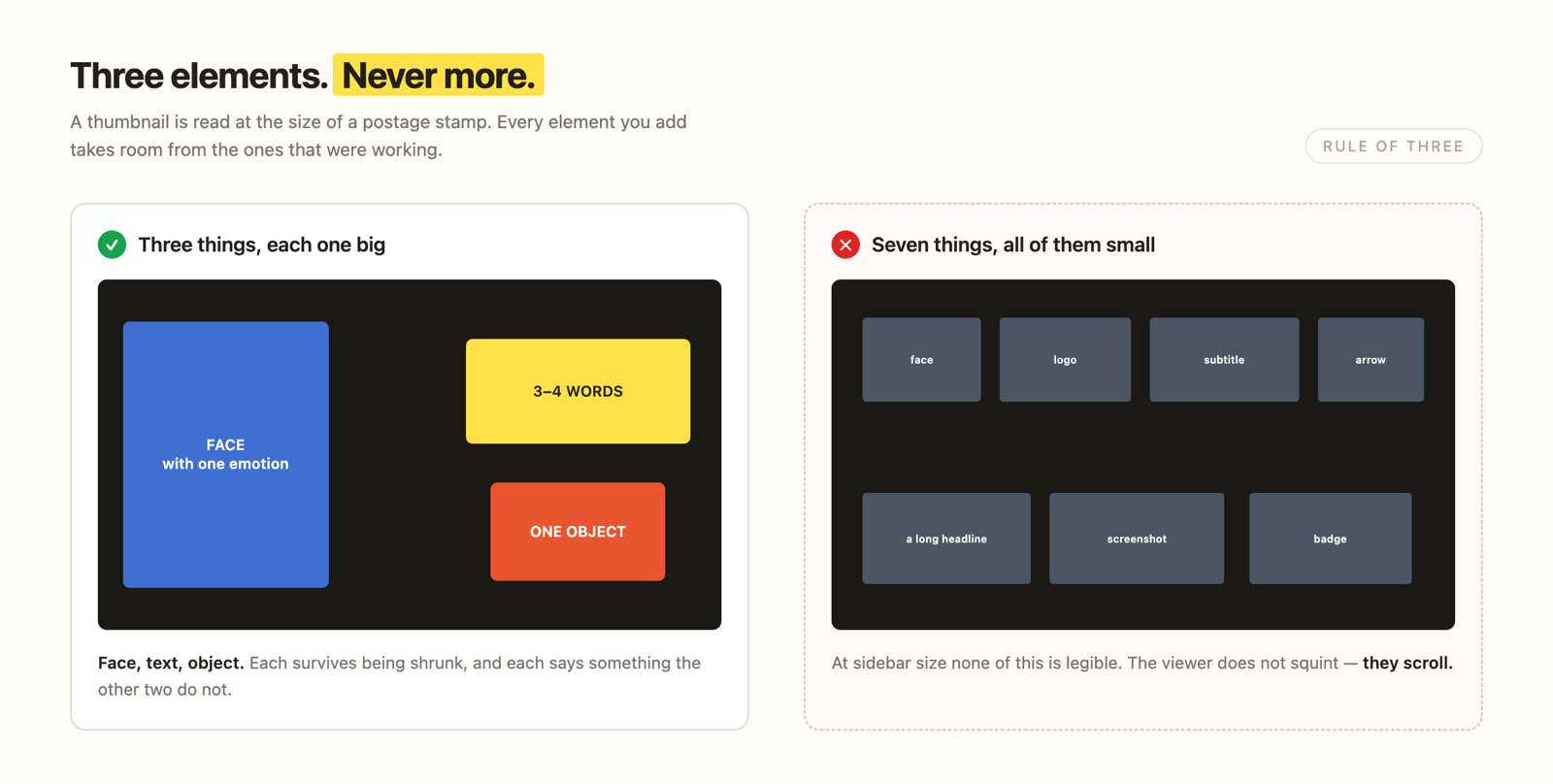
Three elements at most, each big enough to read at sidebar size, strong contrast against both its own background and the other videos in the niche, and an image that supports the title's promise rather than repeating it. Clarity beats decoration, every time.
Can ChatGPT make a YouTube thumbnail?
It can make an image. It cannot make a thumbnail. It has not seen your video, does not know your title, cannot see what your competitors shipped this week, and is pulling towards the average of what thumbnails look like — which is precisely what gets scrolled past. Use it for cleanup, upscaling and plate repair, where it is genuinely excellent.
What size should a YouTube thumbnail be?
1280 × 720 pixels, 16:9, under 2 MB. JPG, PNG and WebP are all accepted.
Which format is best?
PNG if the design is mostly flat colour and text, because the edges stay crisp. JPG if it is mostly photographic. YouTube re-compresses either way, so export at the highest quality you can.
Can you make one on your phone?
Yes — Canva, Picsart and Snapseed all export 1280 × 720. The tool was never the constraint. The process is: find the outliers, pick one promise, use three elements, check it small.
The part that changes everything
Go back to step one for a second. We know the video before we design, because we cut it.
But watch what happens if you push that further. If the thumbnail is the argument for watching, and the video is what pays that argument off, then designing the thumbnail last has the whole thing backwards. You are writing the promise after you have already built the product.
The best-performing videos we work on are the ones where the thumbnail existed before the camera did.
Decide the image and the title first. Then film the video that earns them. It sounds like a production inconvenience and it is — for about one shoot. After that it is the cheapest growth lever you have, because every decision downstream gets made in service of a promise you have already committed to.
AI can hand you a thumbnail in nine seconds. It still cannot hand you the four things we knew before we opened Photoshop.
Want thumbnails that do this for your channel?
We design them as part of every plan, alongside the editing. Book a call and we will walk through your last ten uploads.
Book a call