
This playbook covers what Instagram actually announced, which long videos to make, and how to move viewers from Reels into them. It also gives you a structure for each video, templates you can use today, the numbers to track, and a 30-day plan you can start this week — whether or not you have access yet.
What Instagram actually announced
On 26 October 2026, Instagram head Adam Mosseri and VP of Product Tessa Lyons announced a test of a new long-form format called Features. Here is what has been confirmed.
| What | Detail |
|---|---|
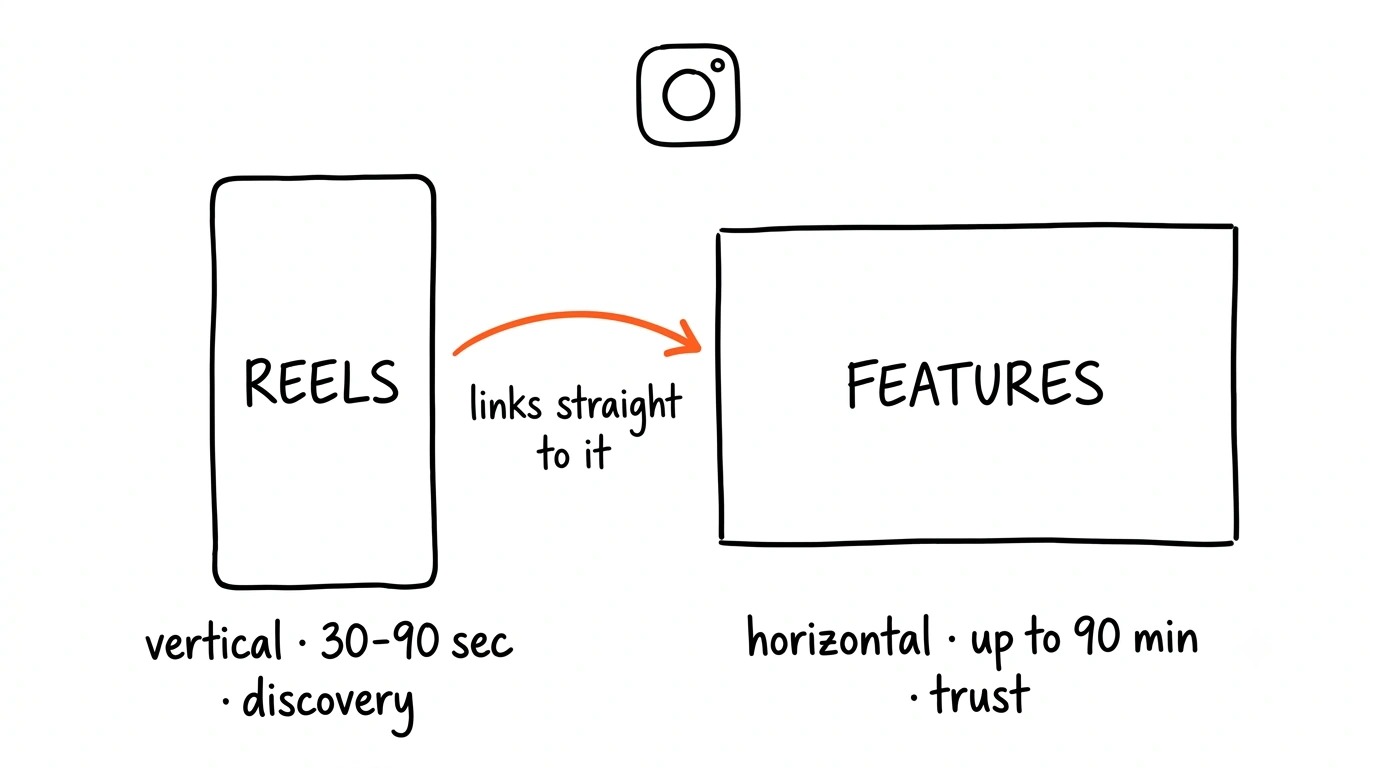
| Format | Horizontal (landscape) video, up to 90 minutes long |
| Who can post | A small group of creators in the US, plus some in Brazil, where it was tested first |
| Expansion | Instagram has signalled it will widen the test to more markets later in the year. No eligibility rules or full timeline yet |
| Where it appears | The main feed, the Explore page, and Instagram's TV app |
| Linked Reels | A separate test, Clips as Reels, lets participating creators link up to eight Reels to one longer video |
| Exclusivity | None. The videos do not have to be exclusive to Instagram |
| Monetisation | No ad revenue share. Meta says it is too early to share a long-term model. Creators can bring their own brand deals |
Instagram has tried long-form before. IGTV launched in 2018 and was wound down in 2022, and Mosseri spent years arguing against it. In the announcement he said he had long been against long-form video on Instagram, and that his worry was it would cannibalise short-form — but that he now hopes the two will be “symbiotic”.
Why this matters for coaches
Features gives you somewhere on Instagram to do what a good sales call does: show people how you think. Here is why to start now, and how to do it without betting everything on a test.
1. Early posts face less competition
New formats always start with few people using them. When Reels arrived in 2020, most accounts kept posting photos and carousels, so the creators who switched early competed with far fewer videos. Features already shows in the main feed and on Explore, and only a small group can post it today. When access widens, the accounts with long videos ready will start ahead.
2. Long videos turn attention into trust
Coaching is a trust sale. Someone who watches you teach for 15 minutes has seen how you explain, how you think, and whether your advice fits their situation. By the time they message you, they are much closer to a decision than someone who saw one Reel.
A 30-second Reel can earn a follow. A 15-minute video can earn a client.
That makes Features a sales asset, not a reach play. There is no ad revenue share, so the return has to come from clients rather than views — which is exactly how a coach should be measuring content anyway.
3. Keep your Reels running
Do not replace your Reels routine with long videos. IGTV closed four years after launch. Mosseri now describes Reels and long videos as working together: Reels bring new people in, Features is where they get to know you. If your Reels stop, the people who would have found your long videos stop arriving too.
4. No access yet? Build the library now
Most accounts cannot post Features, and Instagram has not said when that will change. Use the gap. Record in landscape, turn past workshops into edited replays, and outline your first three videos. Because the videos are not exclusive to Instagram, nothing you make now is wasted — it can live on YouTube today and become a Feature the day access opens.
Which long videos to make first
Start with two formats: teaching videos and workshop or Q&A replays. Both prove your expertise, and both can be built from material you already have.
| Teaching video | Workshop or Q&A replay | |
|---|---|---|
| What it is | One problem solved step by step | An edited recording of a live session |
| Length | 8 to 15 minutes | 20 to 45 minutes after editing |
| Source material | The questions clients ask you most | Webinars, masterclasses, group calls, live Q&As |
| Effort | Plan and record fresh | Edit what you have already recorded |
| What it proves | You can explain clearly | You can handle real questions in real time |
Teaching videos
- One video, one problem. Pick a question clients ask on almost every call. If you have to explain two problems, make two videos.
- Title it as an outcome. “How to price your first premium offer”, “How to plan a training week with three free hours”, “How to run a discovery call that doesn't feel salesy”.
- Plan it to be shown, not just told. Have a screen, a whiteboard, a worksheet or a real example ready for each point.
Workshop and Q&A replays
- Cut the waiting room. Start at the first useful moment, not the housekeeping, the tech checks or “we'll wait a minute for people to join”.
- Record a fresh opening. Film a 30 to 60 second hook and promise and put it before the replay, so it opens like a video rather than a meeting.
- Label each section. An on-screen title for every question or topic, so viewers can follow along and know what is next.
- Get consent. Ask permission from anyone who appears or is named, hide names in the chat, and never publish private one-to-one client calls.
Getting viewers from your Reels into your long videos
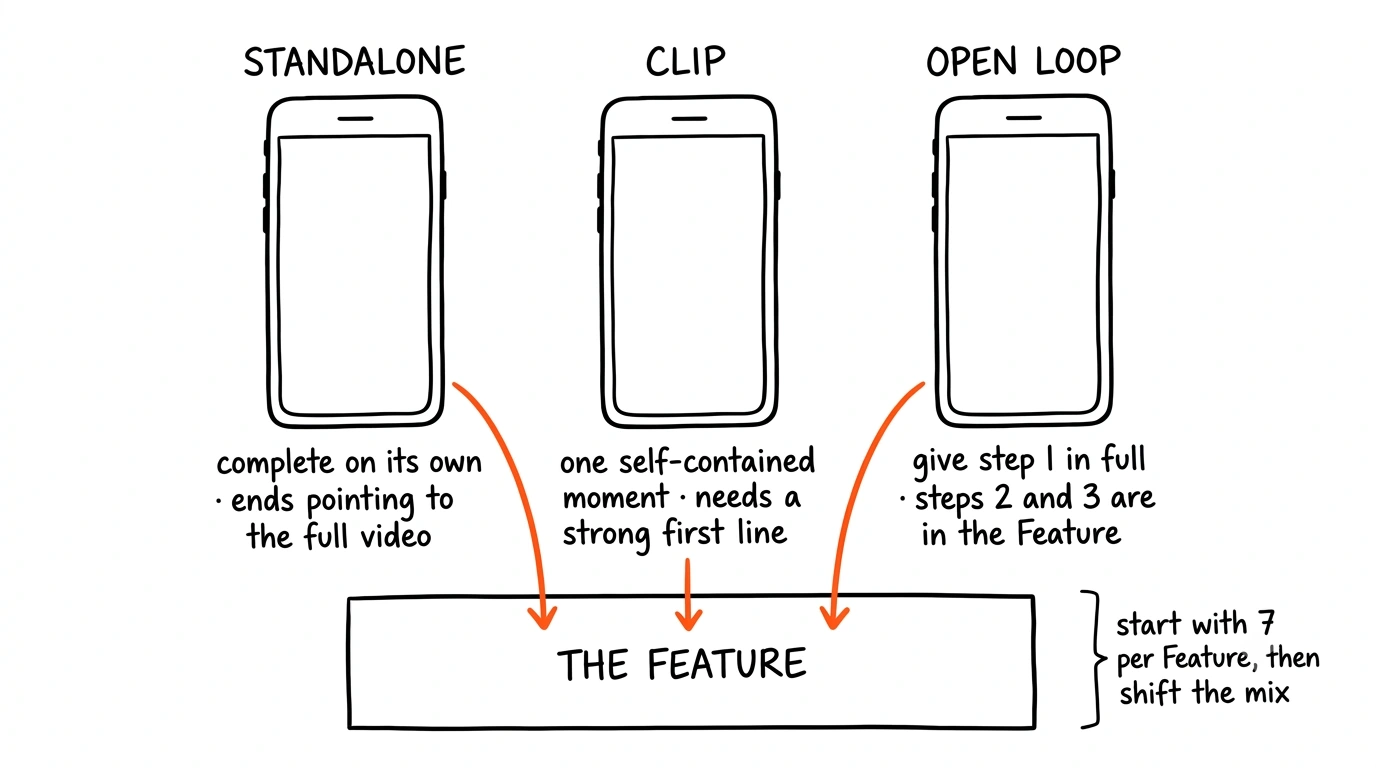
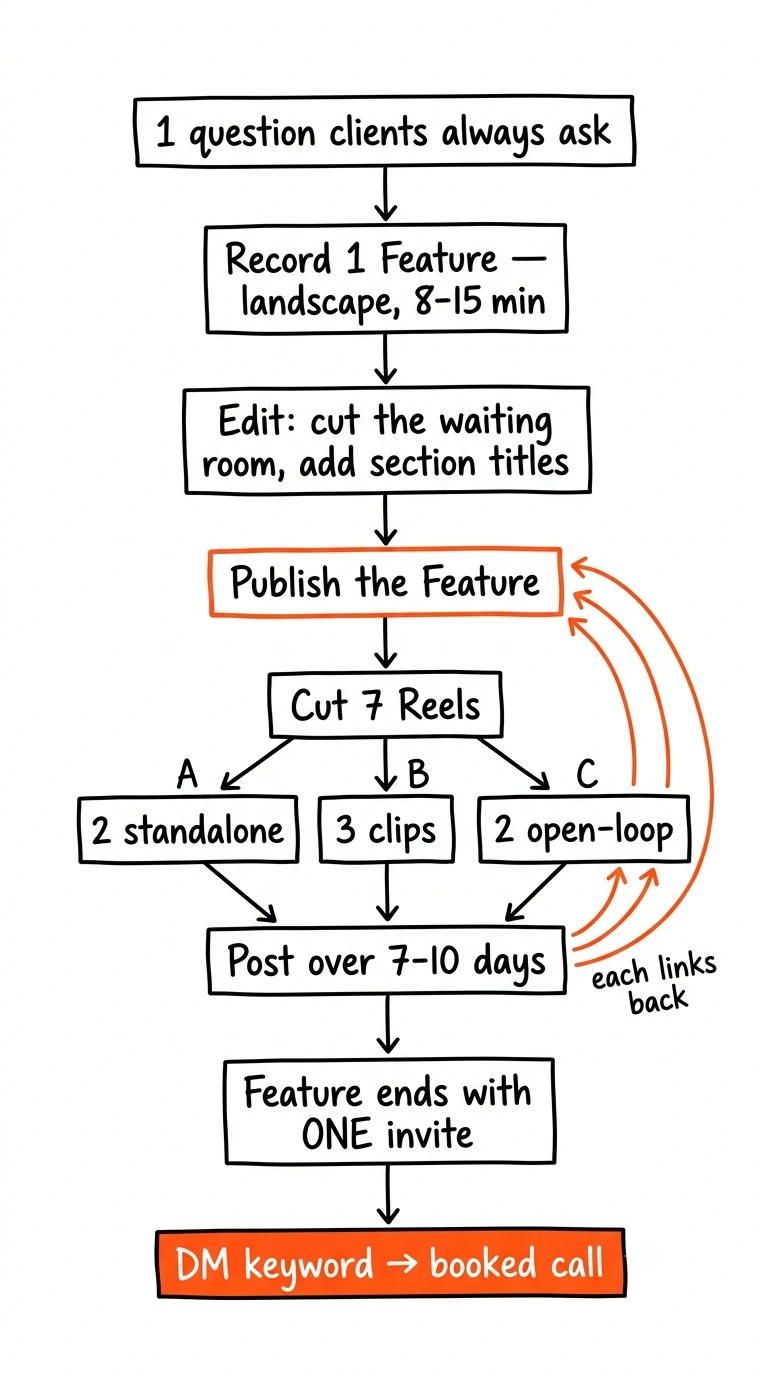
A Reel only sends people to a long video when it gives them a reason to want more. Use three types, and plan several for every Feature — the Clips as Reels test allows up to eight linked to one video.
Standalone Reel with a call to action
A complete short video: one idea, one takeaway, 30 to 90 seconds. It has to be useful to someone who never watches the long version. The last line points to the Feature for the full walkthrough.
Best for: teaching videos, where a clip cut from the middle would not make sense on its own.
Clips from the long video
Cut moments that stand on their own: a strong answer, a client story, a single tip. Each clip needs a clear first line so it makes sense with no context, and a caption saying what the full video covers. AI clipping tools can suggest moments from the transcript, but a person should choose the final cuts.
Best for: workshop and Q&A replays, where each question is already self-contained.
Open-loop Reels
Start a list or a process, give the first part in full, and point to the Feature for the rest. “There are three things to fix before you raise your prices. Here's the first.” The first part must be genuinely useful on its own — a Reel that only teases feels like a trick.
Best for: list-style teaching videos, such as three steps or five mistakes.
How many Reels per Feature
A good starting mix is seven Reels per Feature: two standalone, three clips and two open-loop, posted over one to two weeks. Track which type sends the most viewers to the long video, then shift the mix toward it.
How to structure each long video
Every long video should move through five stages. The middle two, Teach and Show, repeat once for every point you cover. The timings below are for an 8 to 15 minute teaching video; stretch the middle for longer replays.
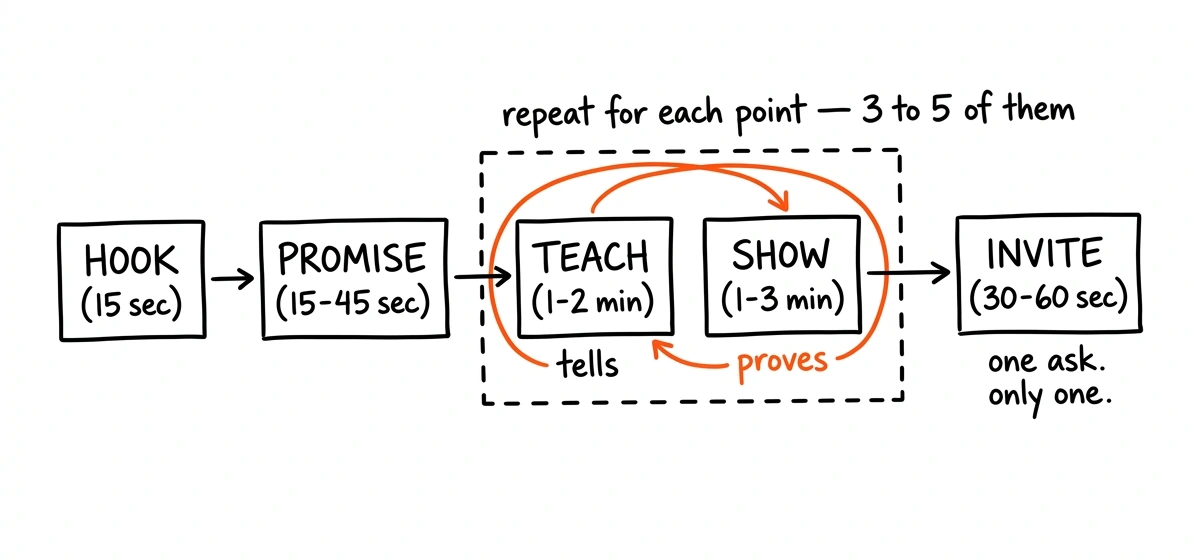
Hook — first 15 seconds
The hook decides whether anyone sees the rest.
- Name the problem in your client's words, not industry terms. “Your calendar is full but your bank account isn't” lands harder than “capacity constraints”.
- Open on your strongest frame: the result on screen, a before and after, or you mid-demonstration. Save “Hi, I'm…” for the Promise.
- Repeat the hook as on-screen text, so it works for people watching without sound.
- Study what already works. Find long videos in your niche that beat the creator's usual view count and note how they open. This is the same outlier research we use when designing thumbnails — borrow the structure, never the words.
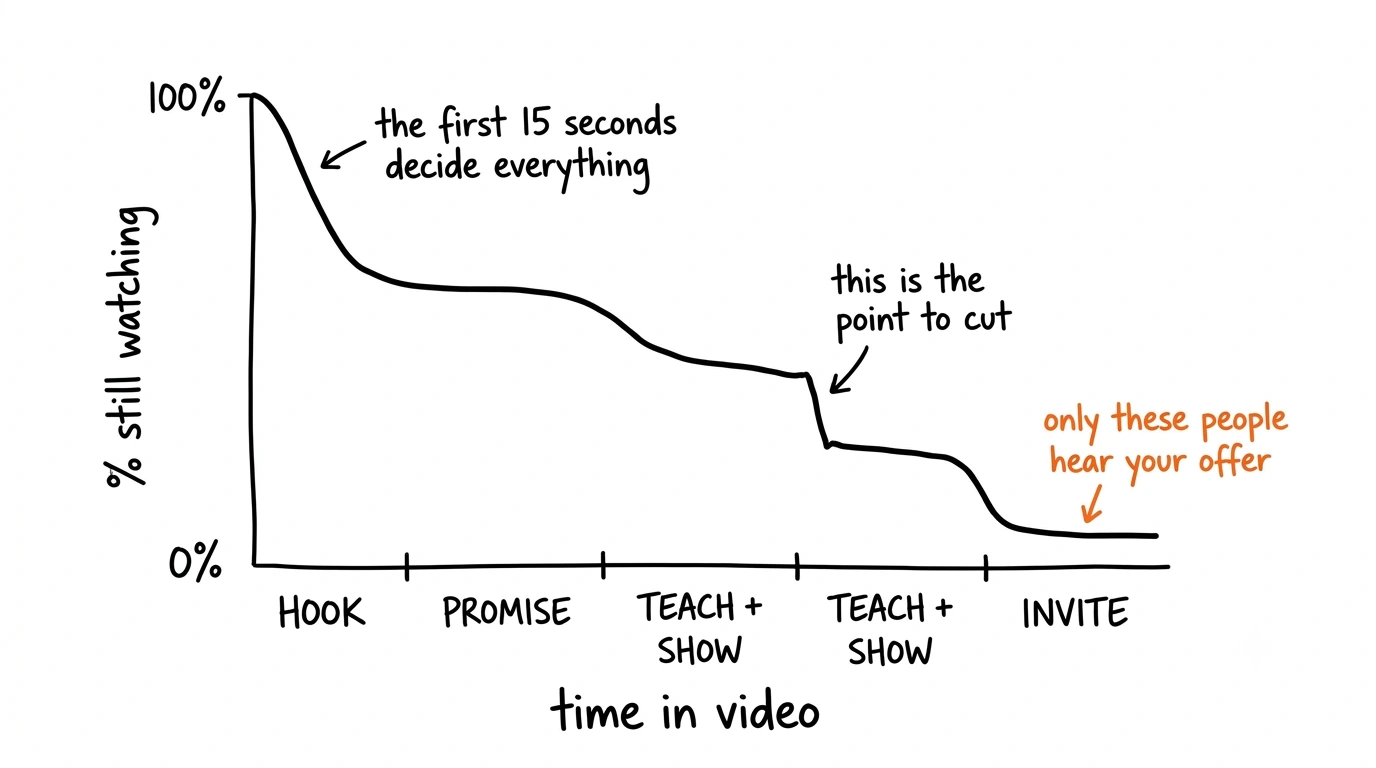
Promise — 15 to 45 seconds
Give viewers a reason to stay for the whole video. Combine two or three of these:
- Outcome — what they will be able to do by the end.
- Roadmap — the points you will cover, listed on screen, so they can see the video has a plan.
- Credibility — one factual line on why you are qualified: years in practice, clients served, a specific result.
- Fit — who this is for, and who it is not for yet. This filters your viewers into better leads.
- Objection — answer the doubt they already have. “This works even if you've never run ads.”
Teach — 1 to 2 minutes per point
- State the idea in one or two sentences.
- Explain why it matters, including the mistake most people make.
- Cut anything the point still makes sense without.
Show — 1 to 3 minutes per point
Teaching tells; showing proves. Make every point concrete before you move on:
- Screen-share the real thing: fill in the template, spreadsheet or tool live.
- Walk through an anonymised client example: their situation, what you changed, what happened.
- Demonstrate it: a form check, a sales-call script, a short role-play.
- End with one action viewers can take today.
Then move to the next point. Three to five points usually fill 8 to 15 minutes. If a point repeats an earlier one, cut it.
Invite — last 30 to 60 seconds
- One call to action only. Two choices usually means neither gets taken.
- Tie it to the outcome they just watched: “If you want help applying this to your business…”
- Match the ask to the trust you have earned. After 15 minutes, a call or a DM is reasonable. After a 30-second Reel, a follow or a tap to the full video is.
- Say it, show it on screen, and put it in the caption.
Templates you can use today
Fill in the brackets with your own topic, client type and results. Only use a number or a claim you can back up.
Hooks
- “Most [type of client] who [common action] still [frustrating result]. Here's what's actually going on.”
- “Here's the exact process we use with clients to [result], step by step.”
- “You don't need [common belief] to [result]. You need [your approach].”
- “I see this mistake with [topic] in almost every client I start with. It's costing them [result].”
- “[The question clients ask you most]? Let's answer it properly.”
- “Before you [big decision], ask yourself these three questions.”
- “Stop [common habit]. Do this instead.”
Promise lines
- “By the end of this video you'll know [outcome] and have a [tool or plan] you can use today.”
- “We'll cover [point 1], [point 2] and [point 3]. Stay for the last one — it's where most people get stuck.”
- “This is for you if [situation]. If you [different situation], this one isn't for you yet.”
- “It's the same process we used to help [type of client] [specific result].”
Reel-to-Feature calls to action
- Standalone: “That's the short version. The full walkthrough, with examples, is linked right here.”
- Clip: “This was one part of a session on [topic]. Watch the whole thing from the link.”
- Open loop: “That's step one. Steps two and three are in the full video, linked here.”
Invites for the end of a Feature
- Comment keyword: “Comment [WORD] and we'll send you the [checklist or template] from this video.”
- DM: “Send me a DM with [WORD] and your biggest question about [topic]. I read every one.”
- Call: “If you want help applying this to your [business], book a free call. The link is in my bio.”
- Next video: “Next, watch [title]. It covers what to do once you've done this.”
The numbers to track
Compare each video against your own average rather than someone else's benchmark. Instagram has not published what Features analytics will include, so track what your Insights show and add the rest yourself.
| Metric | What it tells you | If it's low |
|---|---|---|
| Reel reach to non-followers | Whether your Reels are bringing new people in | Rework the first line; test new topics |
| Taps from Reel to Feature | Whether your Reels create a reason to watch more | Make the CTA clearer; try more open-loop Reels |
| Still watching at 30 seconds | Whether the Hook and Promise are working | Cut the intro; open on the result |
| Average watch time and drop-off | Which point is losing people | Shorten that point or add a Show |
| Viewers who reach the end | Whether anyone hears your Invite | Tighten the middle; cover fewer points |
| Saves and shares | Whether the video is worth keeping or passing on | Make the Show steps more specific |
| Keyword comments and DMs | How many conversations each video starts | Make the Invite about the viewer's outcome |
| Calls booked from content | Whether the videos bring in clients | Add “Where did you find us?” to your booking form |
Your 30-day launch plan
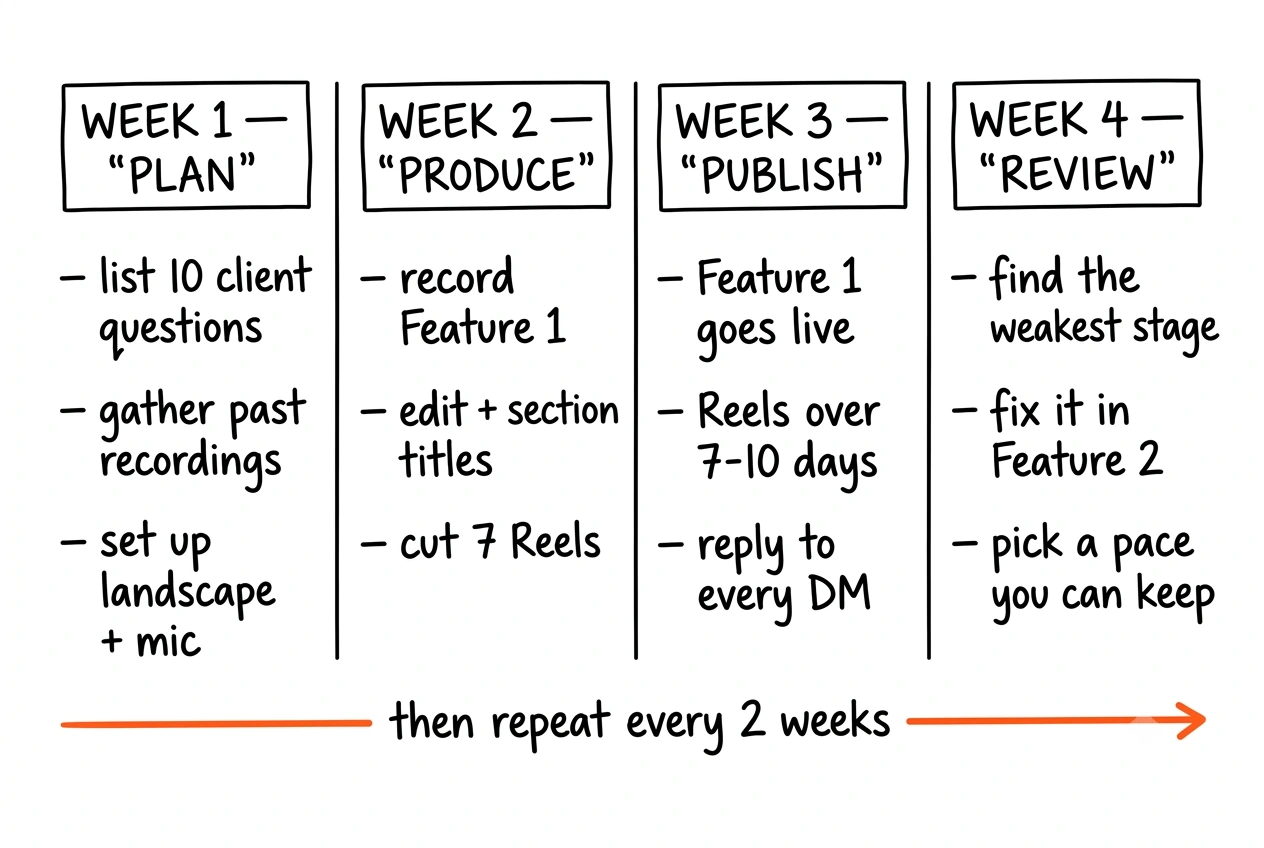
In 30 days you can publish two Features, each with its own set of Reels, while your normal Reels schedule keeps running.
Plan
- List the ten questions clients ask you most, and pick three as your first Features.
- Gather past recordings — webinars, masterclasses, group calls — and confirm you have consent to publish them.
- Set up landscape recording: phone or camera on a tripod, a clip-on mic, light facing you.
- Outline Feature 1 using Hook, Promise, Teach, Show, Invite.
Produce
- Record Feature 1, or edit your strongest replay.
- Edit it: cut pauses and tangents, add section titles and captions.
- Design a cover with a short, readable title. The same rules that make a YouTube thumbnail work apply here — three elements, strong contrast, legible at the size it is actually seen.
- Cut seven Reels: two standalone, three clips, two open-loop.
- Prepare the Invite: the keyword, the free resource, the booking link.
Publish
- Publish Feature 1 and link the Reels to it.
- Post the Reels over seven to ten days, alongside your regular Reels.
- Reply to every comment and DM within a day. That is where leads start.
- Record Feature 2.
Review and repeat
- Check the numbers above and find the weakest stage of Feature 1.
- Fix that stage in Feature 2 before you publish it.
- Publish Feature 2 with its Reels.
- Choose a pace you can keep — one Feature every two weeks is plenty.
If you don't have access yet
Follow the same plan with two changes. Publish the long version on YouTube or your own site, and point your Reels to it with a comment keyword that sends the link by DM. Keep the edited landscape files ready so you can upload them as Features the day access opens. Because Features are not exclusive, nothing you publish elsewhere is wasted.
Mistakes to avoid
- Pausing your Reels. Reels are how new people find your long videos. Keep them running.
- Uploading raw recordings. A replay that opens with five minutes of housekeeping loses viewers before the first point.
- Filming in portrait. Features is horizontal. Record in landscape, and make screen-shared text large enough to read on a phone.
- Stacking calls to action. “Follow, comment, DM and book a call” gets you none of them. Ask for one thing.
- Clips that need context. If a clip only makes sense to someone who saw the full video, it will not bring anyone to the full video.
- Expecting ad revenue. There is no revenue share. Measure success in conversations and booked calls.
- Judging after one video. Give it at least four Features before deciding what works.
Frequently asked questions
What are Instagram Features?
Horizontal videos of up to 90 minutes, posted directly on Instagram. They appear in the main feed, on Explore and in Instagram's TV app, and Reels can link straight to them.
Who can post Features right now?
Only a small test group — creators in the US, plus some in Brazil, where it was tested first. Instagram has not published eligibility rules or a full timeline.
Will Features replace Reels?
No. Mosseri has said he hopes the two will be symbiotic: Reels help people discover you, Features give them the full version.
Can I earn money from Features?
Not through ad revenue sharing. Meta says it is too early to share a long-term model. For coaches, the value is in the clients the videos bring in.
How long should a coach's Feature be?
8 to 15 minutes for a teaching video, 20 to 45 minutes for an edited workshop replay. As long as the content needs and no longer.
Can I link a Reel to a long video?
A separate test called Clips as Reels lets participating creators link up to eight Reels to one longer video.
What if I'm not in the US?
Start preparing anyway. Record in landscape, build a backlog using the structure above, and publish on YouTube or your own site until access reaches your account.
Want this done with you?
We plan, script, film, edit and publish content for coaches and business owners, including long videos and the Reels that feed them. Book a free call and we'll review your existing recordings, pick your first three Features, and map the Reels for each one.
Book your free strategy callSources
- Instagram tests 90-minute horizontal videos called Features — TNW, 26 October 2026
- Instagram tests 90-minute horizontal videos for podcasters — Mediaweek, 26 October 2026
- Instagram tests 90-minute horizontal videos called Features — TechRepublic, 26 October 2026
- Instagram wants you to watch 90-minute videos on your TV — Engadget, 26 October 2026